
How to Encode & Decode Base64 Online in 3 Steps
Base64 is a widely used binary-to-text encoding scheme that converts arbitrary binary sequences or UTF-8 strings into a portable radix-64 representation composed exclusively of 64 printable ASCII characters. Whether embedding small icons directly into CSS stylesheets, parsing authentication headers, or transmitting binary payloads across text-only communication channels, Base64 ensures your bytes remain uncorrupted.
- Select Operation Mode: Toggle between Encode (convert plain text, code, or binary files to Base64) or Decode (reconstruct Base64 strings back to clean UTF-8 text).
- Input Your Data: Paste your source string into the input pane, or drop a file to convert it directly into a Base64 Data URI.
- Copy or Export Result: The converted output appears in real time. Use the single-click copy button to paste the result into your code or terminal.
All encoding and decoding operations run strictly in client-side browser memory via Web API primitives (btoa, atob, and TextEncoder). Your private strings, API tokens, and confidential keys are never transmitted over the internet or stored on remote servers.
What is Base64? RFC 4648 Binary-to-Text Radix-64 Translation
Standardized under IETF RFC 4648, Base64 was designed to solve a fundamental problem in early computer networking: many legacy transmission channels (such as SMTP email protocols, Usenet newsgroups, and telecommunication switches) were designed to handle only 7-bit US-ASCII characters. When raw 8-bit binary data (such as compiled executables, audio files, or images) was transmitted over these legacy channels, control characters and non-printable bytes were frequently stripped, modified, or corrupted.
Base64 solves this by mapping any binary stream into an invariant alphabet of 64 safe printable ASCII characters:
- Uppercase Letters:
AthroughZ(Values 0–25) - Lowercase Letters:
athroughz(Values 26–51) - Numeric Digits:
0through9(Values 52–61) - Special Characters:
+(Value 62) and/(Value 63) - Padding Character:
=(Used to indicate byte alignment)
The Mathematical 6-Bit Encoding Process: 3 Bytes to 4 Characters
To understand how Base64 transforms data, consider the underlying arithmetic. Computer storage measures data in 8-bit bytes ($2^8 = 256$ possible values). Base64 represents numbers in 6-bit chunks ($2^6 = 64$ possible values).
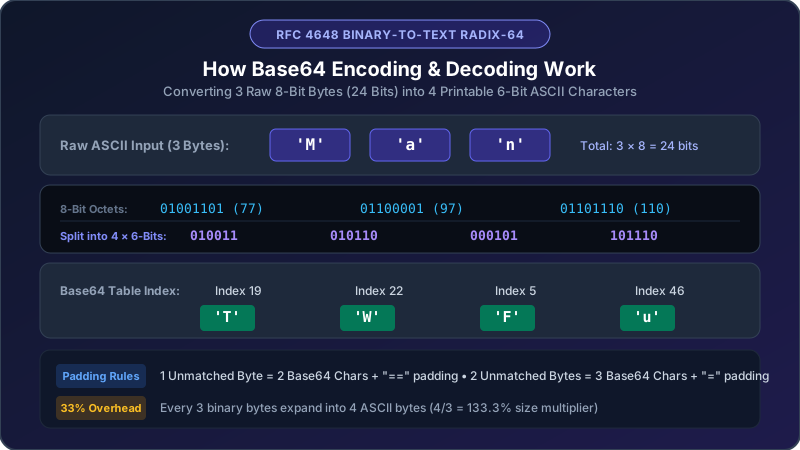
The least common multiple between 8 and 6 is 24. Therefore, the Base64 algorithm processes binary data in blocks of 3 raw bytes (24 bits), re-dividing them into 4 groups of 6 bits each:
Step-by-Step Conversion Walkthrough: Encoding the Word "Man"
- Determine Raw ASCII Values:
'M'= ASCII 77'a'= ASCII 97'n'= ASCII 110
- Convert to 8-Bit Binary Sequences:
'M'$\to$01001101'a'$\to$01100001'n'$\to$01101110- Combined 24-bit stream:
010011010110000101101110
- Re-segment into 4 Six-Bit Chunks:
- Chunk 1:
010011$\to$ Decimal 19 - Chunk 2:
010110$\to$ Decimal 22 - Chunk 3:
000101$\to$ Decimal 5 - Chunk 4:
101110$\to$ Decimal 46
- Lookup Base64 Alphabet Characters:
- Index 19 $\to$
'T' - Index 22 $\to$
'W' - Index 5 $\to$
'F' - Index 46 $\to$
'u'
The resulting Base64 string for "Man" is "TWFu".
Base64 Padding Rules: Why Trailing = Characters Exist
Because the algorithm requires chunks of exactly 3 input bytes, input streams whose length is not divisible by 3 produce remainder bytes that require special padding:
Case 1: Input Length Modulo 3 = 1 (1 Remainder Byte)
If you encode the single character "M" (8 bits total: 01001101):
- First 6 bits:
010011$\to$ Index 19 ('T') - Remaining 2 bits:
01, padded with four zeros to complete 6 bits:010000$\to$ Index 16 ('Q') - Two missing 6-bit slots are padded with two equal signs (
==) - Output:
"TQ=="
Case 2: Input Length Modulo 3 = 2 (2 Remainder Bytes)
If you encode the two characters "Ma" (16 bits total: 01001101 01100001):
- Chunk 1:
010011$\to$ Index 19 ('T') - Chunk 2:
010110$\to$ Index 22 ('W') - Remaining 4 bits:
0001, padded with two zeros:000100$\to$ Index 4 ('E') - One missing 6-bit slot is padded with one equal sign (
=) - Output:
"TWE="
The 33.3% Data Overhead: File Size Considerations
A crucial trade-off of Base64 encoding is file size expansion. Because every 3 input bytes are represented by 4 output ASCII characters, the data footprint increases by exactly one-third:
$$\text{Encoded Size} = \lceil \frac{N}{3} \rceil \times 4 \approx N \times 1.333 \quad (+33.3\%)$$
| Raw File / Data Size | Encoded Base64 Output Size | Net Size Expansion | Recommended Use? |
|---|---|---|---|
| Small PNG Icon (2 KB) | ~2.67 KB | +670 Bytes | Yes (Eliminates HTTP request roundtrip) |
| Avatar Thumbnail (25 KB) | ~33.3 KB | +8.3 KB | Acceptable for inline email templates |
| Hero Image (500 KB) | ~666.7 KB | +166.7 KB | No (Blocks CSS rendering, hurts LCP) |
| Video Clip (10 MB) | ~13.3 MB | +3.3 MB | Never (Severely degrades load speed) |
[!TIP]
For web performance, restrict Base64 inline embedding to micro-assets under 4 KB (such as SVG icons or placeholder blur images). For large photos or documents, serve files through standard HTTP/2 or HTTP/3 caching pipelines.
Practical Applications in Modern Software Engineering
Base64 is utilized across numerous cloud, web, and security protocols:
1. Data URIs for Inline CSS & HTML
Instead of dispatching an additional network request to fetch an image, developers embed small images directly using Data URIs:
```html
<img src="data:image/png;base64,iVBORw0KGgoAAAANSUhEUgAAAAEAAAABCAYAAAAfFcSJAAAADUlEQVR42mNk+M9QDwADhgGAWjR9awAAAABJRU5ErkJggg==" alt="1x1 Red Pixel" />
```
2. HTTP Basic Authentication Headers
The HTTP Authorization header standard (RFC 7617) requires credentials to be concatenated as username:password and Base64-encoded:
```http
GET /api/v1/dashboard HTTP/1.1
Host: api.example.com
Authorization: Basic YWRtaW46c2VjcmV0cGFzczEyMw==
```
3. Email MIME Attachments (RFC 2045)
Because email transport protocols (SMTP) remain text-oriented, binary files (such as PDF invoices, Word documents, and photos) attached to emails are automatically encoded into Base64 blocks before dispatch.
4. JSON Web Tokens (JWT) & Base64URL
JWTs consist of three segments separated by dots (header.payload.signature). Each segment is encoded using Base64URL (RFC 4648 Section 5), which replaces + with -, replaces / with _, and omits trailing = padding characters to prevent URL parsing errors.
Developer Code Snippets: Encoding Base64 Across Languages
1. Python 3 (base64 Standard Library)
```python
import base64
Encoding UTF-8 text to Base64
raw_text = "Secure API Token 2026"
encoded_bytes = base64.b64encode(raw_text.encode('utf-8'))
base64_string = encoded_bytes.decode('utf-8')
print("Base64:", base64_string)
Decoding Base64 back to text
decoded_bytes = base64.b64decode(base64_string)
decoded_text = decoded_bytes.decode('utf-8')
print("Original:", decoded_text)
```
2. Modern JavaScript (Browser & Node.js)
```javascript
// Browser (Unicode-safe Base64 encoding)
function utf8ToBase64(str) {
const bytes = new TextEncoder().encode(str);
const binString = Array.from(bytes, (byte) => String.fromCodePoint(byte)).join("");
return btoa(binString);
}
function base64ToUtf8(b64) {
const binString = atob(b64);
const bytes = Uint8Array.from(binString, (m) => m.codePointAt(0));
return new TextDecoder().decode(bytes);
}
// Node.js Buffer API
const b64 = Buffer.from("Hello World", "utf-8").toString("base64");
const orig = Buffer.from(b64, "base64").toString("utf-8");
```
3. Linux & macOS Terminal CLI
```bash
Encode a string
echo -n "Developer Tools" | base64
Decode a Base64 string
echo -n "RGV2ZWxvcGVyIFRvb2xz" | base64 --decode
Encode a binary file into a text file
base64 -i icon.png -o icon.txt
```
Critical Security Warning: Base64 is NOT Encryption
A persistent misconception among novice developers is treating Base64 as a method of data security:
[!CAUTION]
Base64 provides zero confidentiality. It is not an encryption cipher. It involves no secret keys, initialization vectors, or cryptographic hashes. Anyone with access to a Base64 string can decode it back to plaintext in a single microsecond. Never use Base64 to "protect" passwords, credit card numbers, or sensitive database records without pairing it with genuine AES-256 or RSA encryption.