
How to Convert JPG to PNG in 3 Simple Steps
Convert standard JPEG images into lossless, editing-ready PNG graphics in seconds with complete privacy:
- Select or Drop JPG Files: Click the upload area above to choose
.jpgor.jpegphotos from your device, or drag and drop files directly onto the canvas. You can also paste copied images straight from your clipboard usingCtrl+V(orCmd+Von macOS). - Review Batch Queue: Check your uploaded images in the queue. Each photo will be rasterized in full 24-bit RGB pixel fidelity, preparing it for graphic design, transparency cutouts, or archiving without generational compression loss.
- Convert and Download: Click Convert All Files to process your images client-side in browser RAM. Save individual PNG files or download the full batch at once with Download All as ZIP.

How to Convert JPG to PNG Without Losing Quality
Because JPEG is inherently a lossy compression format, converting it into PNG stops further degradation. Here is how our engine guarantees the highest possible visual clarity:
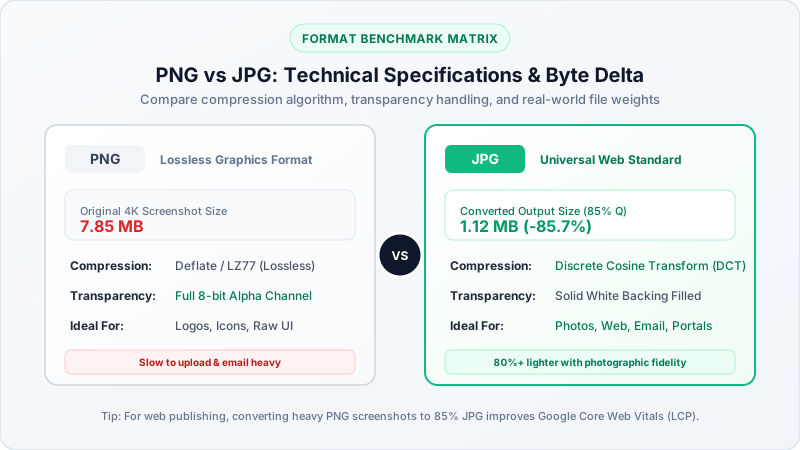
- 100% Exact Pixel Replication: Our browser canvas decodes the DCT compressed blocks into an uncompressed RGB bitmap and re-encodes it using Deflate/LZ77 lossless compression without downsampling or smoothing filters.
- Preserve Full Resolution: Multi-megapixel camera captures and 4K images keep their exact pixel width and height.
- Zero Generational Loss: Unlike saving as JPEG again (which adds another layer of compression noise and blurriness), PNG can be opened, edited, and saved repeatedly with zero loss in fidelity.
Why Does Converted PNG File Size Increase?
A common question users ask is: Why is my converted PNG file 2x to 3x larger than the original JPG?
- Lossy vs. Lossless Algorithms: JPEG compresses photographic data aggressively by discarding high-frequency color variations that human eyes rarely notice. PNG stores full 24-bit uncompressed RGB color data with lossless compression.
- Preparing for Clean Edits: The increase in byte size is the natural trade-off for arresting compression decay. PNG acts as a lossless container, making it ideal for editing masters in Photoshop, GIMP, Figma, or Canva.
- If You Need Smaller File Size: If your goal is to shrink photo file size rather than halt generational quality loss, use our Image Compressor to 200KB or convert to modern JPG to WebP.
Preparing JPG Images for Transparent Cutouts & Alpha Channels
Standard JPG images cannot contain transparent backgrounds. When you plan to remove backgrounds, cut out product photos, or add alpha masks:
- Convert your initial JPG or JPEG to PNG using BestConverter.
- Open the resulting lossless PNG in your favorite photo editor or background removal tool.
- Because the file is now in PNG format, any pixels you erase or mask will become truly transparent rather than solid white.
Batch JPG to PNG Conversion Across Platforms
BestConverter requires no software installation, no browser extensions, and no cloud uploads:
1. Windows 11 & Windows 10
Drop camera photos and downloaded JPEGs directly into your browser. Convert them to PNG before importing into Microsoft Paint 3D, PowerPoint, or video editors like Premiere Pro and DaVinci Resolve.
2. Apple macOS
Convert iPhone camera snapshots and client JPEG submissions into lossless PNG files for Keynote presentations, Sketch designs, or Xcode asset catalogs.
3. iOS (iPhone & iPad) & Android
Convert camera roll JPEGs to PNG directly in Safari or Chrome without uploading confidential photos to third-party server apps.
Why In-Browser Conversion Beats Server-Based Converters
- Zero Server Uploads: Your photos never leave your device RAM, guaranteeing complete privacy for family photos, scanned documents, and corporate creative assets.
- Instant Processing: No waiting in cloud conversion queues or watching progress wheels.
- Batch Processing: Convert photos locally without artificial paywalls or subscriptions.
- Works Offline: Once the page loads, you can disconnect from Wi-Fi and continue converting files seamlessly.