
How to Convert PDF Pages into High-Quality JPG Images
Extracting high-resolution pages and documents from PDF format into universal JPG images is fast and private:
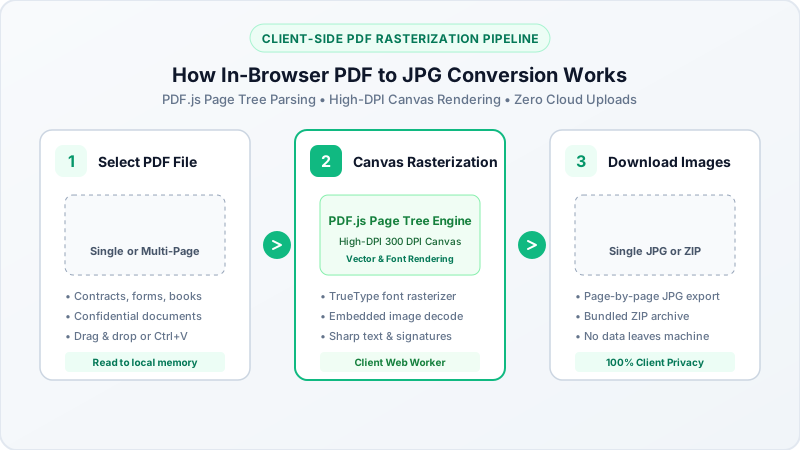
- Select or Drop Your PDF: Click browse or drag and drop your PDF document into the upload area above.
- Select Page Range & Quality: Choose whether to convert all pages or extract specific single pages, and set your desired output resolution.
- Convert and Download: Click Convert to JPG Now. Our client-side rendering engine parses the PDF byte structure locally in device memory. Download individual JPEG pages or get all pages together in a clean ZIP file.
Why Convert PDF Documents to JPG Images?
While PDF format is standard for document archival, converting pages into JPG images is essential for common digital workflows:
- Social Media & Messaging Apps: Platforms like Instagram, Facebook, and WhatsApp do not allow direct PDF previews in image carousels. Converting to JPG makes sharing visual slides, receipts, and infographics effortless.
- Office Presentations & Word Documents: Inserting a high-resolution JPG into PowerPoint slides, Google Docs, or Word files is smoother than embedding multi-page PDF attachments.
- Online Portals & Identity Verification: Many government, visa, and banking recruitment portals restrict document uploads strictly to
.jpgor.jpegformats below 200KB or 50KB. - Fast Web Embedding: Loading a JPEG image using a standard HTML
<img>tag is significantly faster for website visitors than embedding heavy PDF viewer plugins.
Comparison: PDF Document vs JPG Image Format
| Feature / Metric | PDF Document Format | JPG / JPEG Image Format |
|---|---|---|
| File Structure | Compound container (vector text, raster images, fonts) | Raster compressed 24-bit RGB pixel bitmap |
| Universal Viewer Support | Requires PDF reader application or browser plugin | Natively opens on 100% of smartphones and computers |
| Web Page Embedding | Requires heavy iframe or JavaScript viewer | Standard <img> tag with instant lazy-loading |
| Editing & Cropping | Requires specialized PDF editor software | Easily cropped, filtered, or resized in any photo tool |
| File Size for Single Page | Often contains embedded font tables and metadata | Highly optimized DCT compression with adjustable quality |
Converting PDF to JPG Across Operating Systems
- On Windows 11 & Windows 10: Convert multi-page PDF contracts, invoices, and study guides to JPG in Microsoft Edge or Google Chrome without purchasing commercial PDF software.
- On Apple Mac (macOS): Convert PDF pages directly in Safari without needing Adobe Acrobat Pro subscriptions.
- On iPhone & iPad (iOS): Upload PDFs from Apple Files or iCloud Drive, render pages locally, and save the resulting JPGs directly to your Photos app.
- On Android: Open Chrome, select your PDF document from Files or Google Drive, and download high-resolution JPG pages instantly.