
How to Generate Free Custom QR Codes Online in 3 Steps
A Quick Response (QR) Code is a two-dimensional barcode capable of storing thousands of alphanumeric characters in a high-density, optical pixel matrix readable by any smartphone camera. From restaurant menus, event ticket validation, and retail packaging to Wi-Fi sharing and two-factor authentication setup, QR codes seamlessly bridge the physical and digital worlds.
- Choose Payload Type & Enter Content: Select your target format—Website URL, plain text, guest Wi-Fi network credentials, email dispatch, or contact information—and input your data into the content field.
- Select Error Correction Level: Choose your desired Reed-Solomon restoration tier (Level L for digital screens, Level M for general paper print, or Level H for outdoor stickers and product packaging).
- Instant Preview & Download: The QR matrix generates dynamically as you type. Download a crystal-clear, high-resolution PNG image directly to your workstation or phone.
All QR code matrices are rendered locally using client-side JavaScript canvas rendering. Your Wi-Fi network passwords, proprietary web links, and contact records are never transmitted to external databases or stored on remote tracking servers.
The Invention & History of QR Codes: Denso Wave & ISO/IEC 18004
The QR Code was invented in 1994 by Japanese automotive engineer Masahiro Hara at Denso Wave (a subsidiary of Toyota). Traditional one-dimensional UPC barcodes—found on grocery store products—could only store approximately 20 alphanumeric characters along a horizontal axis. Automotive assembly lines required tracking hundreds of parts, prompting the need for a 2D matrix capable of holding vastly more data.
Inspired by the black-and-white stone patterns of the board game Go, Hara and his engineering team designed a square matrix with specialized geometric markers that could be decoded up to ten times faster than existing 2D codes. In 1999, Denso Wave made a historic decision: they patented the technology but released it completely patent-free and royalty-free to the world. In 2000, the International Organization for Standardization formalized it as ISO/IEC 18004.
The Anatomy of a QR Code: 6 Essential Matrix Components
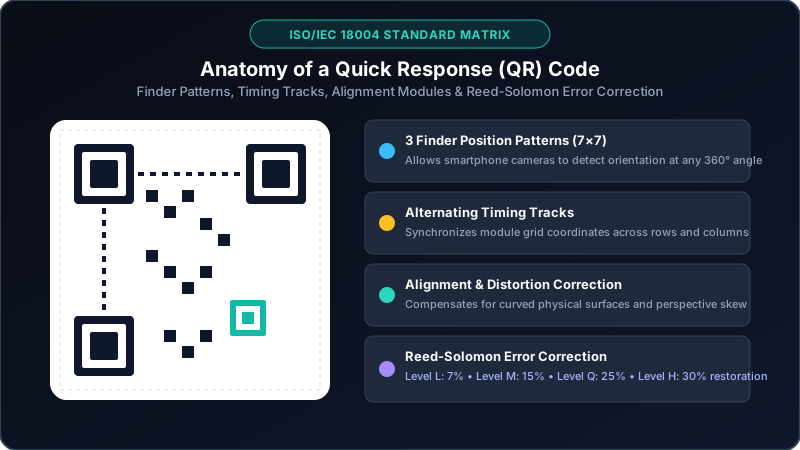
A modern QR code is not just a random grid of black and white squares. Every module serves a specific geometric and algorithmic function defined by ISO/IEC 18004:
1. Finder Position Patterns (Three 7×7 Corner Squares)
Located in the upper-left, upper-right, and lower-left corners, these iconic concentric square patterns allow scanner cameras to instantly detect the presence, orientation, and angle of the QR code, enabling scanning from any 360° perspective.
2. Separator Bands (1-Module White Borders)
Clean, 1-module-wide white borders separate each Finder Pattern from the adjacent data area, preventing visual confusion during edge detection.
3. Timing Patterns (Alternating Coordinate Tracks)
A horizontal track connecting the top two Finder Patterns and a vertical track connecting the left two patterns contain alternating black and white modules. These tracks establish the precise coordinate grid and tell the scanner the Version number and size of the matrix.
4. Alignment Patterns (Internal Perspective Correction)
As QR codes scale in Version size (from Version 1 at 21×21 up to Version 40 at 177×177 modules), small nested square alignment patterns are inserted across the body. These markers allow scanner software to normalize perspective distortion caused by curved surfaces (e.g. cans or bottles) or angled camera shots.
5. Format Information & Mask Patterns
Located adjacent to the Finder Patterns, these modules encode the chosen Error Correction Level (L, M, Q, or H) and the mathematical Mask Pattern (0 through 7) used to prevent large clusters of identical white or black modules that could confuse optical camera sensors.
6. Quiet Zone (The Crucial 4-Module Margin)
A completely blank border surrounding all four outer edges of the QR code. The ISO standard requires this border to be at least 4 modules wide to ensure the camera sensor does not blend background graphics with the matrix.
Reed-Solomon Error Correction: Self-Healing Pixel Algorithms
One of the greatest engineering achievements of the QR code is its ability to remain fully readable even if dirty, torn, or partially obscured by logos. This resilience is powered by Reed-Solomon error correction algorithms:
| Error Correction Level | Data Recovery Capacity | Matrix Density | Best Application |
|---|---|---|---|
| Level L (Low) | ~7% of code can be damaged | Lowest density (largest modules) | Crisp digital screens, email signatures, clean indoor signage |
| Level M (Medium - Default) | ~15% of code can be damaged | Balanced density | Standard paper flyers, business cards, restaurant table tents |
| Level Q (Quartile) | ~25% of code can be damaged | Higher density | Retail product boxes, industrial inventory, shipping labels |
| Level H (High) | ~30% of code can be damaged | Highest density | Outdoor billboards, vehicle decals, or QR codes with center logos |
[!TIP]
If you plan to embed a company logo in the center of your QR code, always generate the code using Level H error correction. Level H ensures that the ~30% of data obscured by your central graphic is mathematically reconstructed by the scanner without scan failure.
Supported QR Code Payload Formats & Syntax Guide
Modern smartphones natively parse various standard URI schemes when a QR code is recognized by the camera:
1. Website URLs
```text
https://zixtool.online/
```
Directs the user's mobile browser to any web page, web app, or document download.
2. Guest Wi-Fi Network Credentials
```text
WIFI:S:OfficeGuest;T:WPA;P:SuperSecretPass2026;;
```
When scanned on iOS or Android, prompts the user: "Join network OfficeGuest?" Users connect with one tap without manually typing passwords.
- S: Network SSID / Name
- T: Security type (
WPA,WEP, ornopass) - P: Wi-Fi password
3. Electronic Business Cards (vCard 3.0)
```text
BEGIN:VCARD
VERSION:3.0
N:Doe;Jane;;;
FN:Jane Doe
ORG:Acme Corporation
TITLE:Lead Cloud Architect
TEL;TYPE=CELL:+1-555-0199
EMAIL:jane.doe@example.com
URL:https://example.com
END:VCARD
```
Automatically prompts the user's smartphone to save a complete new contact directly to their address book.
4. Direct SMS or Phone Call
- SMS:
SMSTO:+15550199:Interested in your consulting service - Phone:
tel:+15550199
Static vs. Dynamic QR Codes: The Truth About "Expiring" Codes
Many commercial online QR code generators deceive users into creating "dynamic" QR codes that redirect through proprietary tracking URLs. After 14 or 30 days, these services disable the redirect and demand a $20 to $50 monthly subscription to reactivate your printed marketing materials!
Static QR Codes (What BestConverter Generates)
- Direct Encoding: The destination URL, Wi-Fi password, or text is encoded directly into the pixel modules.
- Permanent & Free: Because there is no intermediary proxy server, static QR codes never expire. They remain functional forever as long as the destination website or Wi-Fi network exists.
- 100% Private: Zero telemetry tracking, zero cookies, zero user profiling.
Dynamic QR Codes (Commercial Subscriptions)
- Redirect Architecture: The code embeds a short URL (e.g.
qr.biz/x9f2) that forwards to your final URL. - Risk: If the generator company shuts down, changes pricing, or your subscription lapses, your printed QR codes fail immediately.
Best Practices for Printing & Sizing QR Codes
To guarantee rapid scanning across all lighting conditions and camera lenses, observe these professional print guidelines:
- Maintain Strong Color Contrast: The dark modules should always be darker than the light background. Traditional black on white provides the highest optical contrast. Avoid low-contrast color pairings like yellow on white or dark grey on black.
- Never Invert (Negative) Colors: While some camera scanners can read light QR codes on dark backgrounds, many older budget smartphones fail completely on inverted codes. Always prefer a light background with dark modules.
- The 10:1 Distance-to-Size Ratio Rule: As a rule of thumb, the size of your printed QR code should be roughly 1/10th of the scanning distance:
- Business card or menu (scanned from 20 cm away): Minimum size = 2 cm × 2 cm (0.8" × 0.8").
- Poster or banner (scanned from 2 meters away): Minimum size = 20 cm × 20 cm (8" × 8").
- Highway billboard (scanned from 20 meters away): Minimum size = 2 m × 2 m (6.5 ft × 6.5 ft).
- Preserve the Quiet Zone: Never place typography, graphic borders, or logos within the 4-module quiet zone margin surrounding the code.