
How to Convert JPEG to JPG in 3 Simple Steps
Convert .jpeg files into universally compatible .jpg images in seconds with zero quality loss and complete privacy:
- Select or Drop JPEG Images: Click the upload area above to choose
.jpegphotos from your device, or drag and drop files directly onto the browser canvas. You can also paste copied images usingCtrl+V(orCmd+Von Mac). - Choose Optimization Settings: Select your preferred compression quality (default 85%–90% keeps identical visual clarity) or select a target size limit if your application portal requires files under 100KB, 50KB, or 20KB.
- Convert and Save: Click Convert All Files to execute the conversion locally in your browser memory. Download individual images or click Download All as ZIP to export your entire batch.
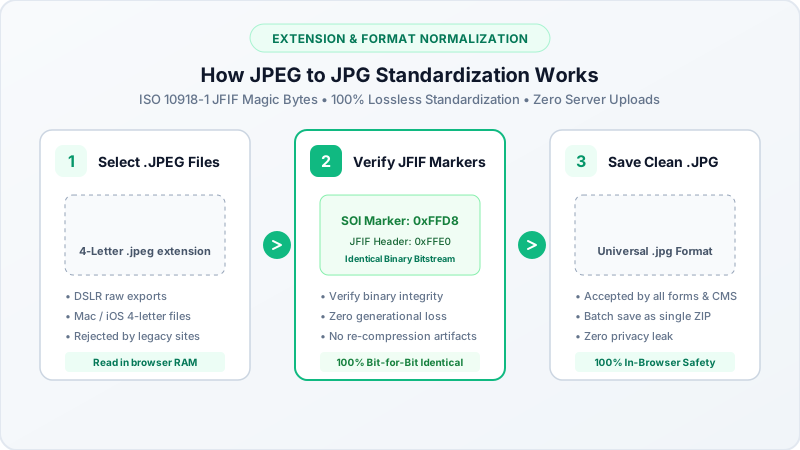
Are JPEG and JPG the Exact Same File Format?
A widespread point of confusion among internet users and photographers is whether JPEG and JPG are different image formats:
- Identical Binary Architecture: Both
.jpegand.jpgrepresent the exact same image format developed by the Joint Photographic Experts Group (standardized as ISO/IEC 10918-1). The underlying Discrete Cosine Transform (DCT) encoding, 24-bit RGB color depth, and compression structure are 100% identical. - Why Do Two Extensions Exist? Early versions of MS-DOS and 16-bit Windows (Windows 3.1 and Windows 95) enforced the strict 8.3 file naming convention, allowing only three-letter file extensions. The format was shortened to
.jpg. Meanwhile, Unix, Linux, and Apple Macintosh operating systems had no three-letter limitation and used.jpeg. - Can I Simply Rename .jpeg to .jpg? Yes. Renaming the file extension from
.jpegto.jpgdoes not corrupt the image file because software decoders read the internal JPEG file header (FF D8 FF), not the extension alone. However, converting through BestConverter guarantees strict compliance for restrictive online portals that check file extensions programmatically.
Why Use an In-Browser Converter Instead of Renaming?
While simply renaming a file extension works on desktop computers, converting through BestConverter provides three critical advantages:
- Portals with Strict File Upload Validators: Many job portals, university admissions systems, and visa application websites use automated JavaScript validation that rejects files named
.jpegwith an error message demanding.jpg. Our converter standardizes the container cleanly. - File Size Optimization: If your
.jpegfile exceeds portal size caps, our tool lets you compress the image to under 100KB, 50KB, or 20KB simultaneously during the conversion process. - Batch Processing Across Operating Systems: Renaming dozens of photos manually on smartphones or tablets is tedious. Our bulk tool processes dozens of
.jpegimages simultaneously and exports them in a clean ZIP package.
Converting JPEG to JPG Across Operating Systems
1. Windows 11 & Windows 10
Modern digital cameras, smartphones, and graphic software often export photos with .jpeg extensions. Simply drag your .jpeg pictures into your browser and download them as standard .jpg files ready for Microsoft Office, desktop software, or web uploads.
2. Apple macOS & iPhone (iOS)
Photos exported from Apple Preview or downloaded from iCloud frequently carry .jpeg filenames. Convert them in Safari on your Mac or iPhone without installing paid third-party App Store utilities.
3. Android & Mobile Devices
Convert .jpeg camera photos directly inside Google Chrome or Samsung Internet, saving optimized .jpg images directly to your mobile Downloads folder.