
How to Compress Photos Online in 3 Quick Steps
Reduce large photo files from smartphones, digital cameras, and scanners by up to 80% without losing visual clarity:
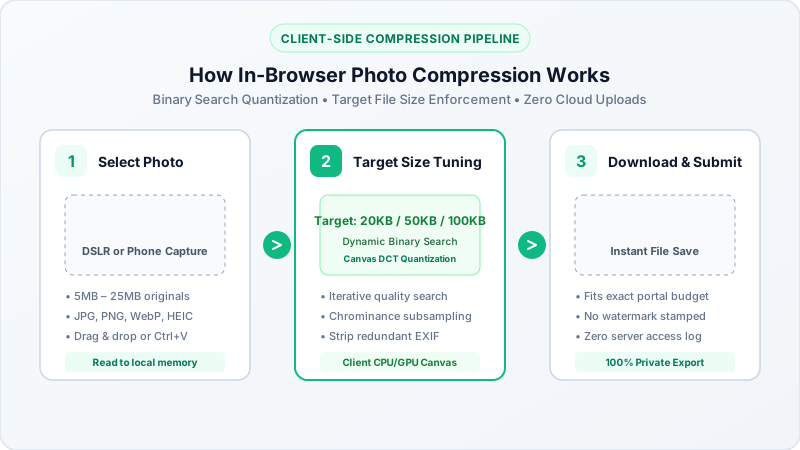
- Select or Drop Photos: Click the upload area above to choose single or multiple JPG, PNG, or WebP photos from your device, or drag and drop images directly into your browser.
- Choose Target Size or Adjust Quality: Pick an exact file size ceiling (such as 20KB, 50KB, 100KB, 200KB, or 500KB) or adjust the quality slider to match your exact application specifications.
- Download Instant Optimized Photos: Click Convert All Files to compress images directly in browser RAM. Download each photo individually or save all files in a single ZIP archive.
Why Use an In-Browser Photo Size Reducer?
When preparing photos for government recruitment portals, job applications, or email attachments, traditional cloud compressors require uploading sensitive pictures to remote servers.
BestConverter runs entirely inside your device hardware:
- 100% Client-Side Privacy: Sensitive personal portraits, ID card photos, and family pictures never leave your computer or phone.
- Zero Upload Latency: Because files are processed in local memory, large 10MB or 20MB photos compress in under a second without slow network transfers.
- Batch Processing: Compress dozens of photos simultaneously without artificial daily quotas, subscription paywalls, or forced watermarks.
- Works Offline: Once this page loads, you can turn on Airplane Mode or disconnect from Wi-Fi and continue compressing photos offline.
Matching Official Portal Byte Limits & Dimensions
Government portals, civil service commissions, and university admissions enforce strict file size budgets:
| Application Type | Target File Size Budget | Typical Dimensions | Recommended Tool |
|---|---|---|---|
| Passport Photos | 20KB to 50KB | 35mm x 45mm (200 x 230 px) | Passport Photo Resizer |
| Candidate Signatures | 10KB to 20KB | 140 x 60 pixels | Compress Image to 20KB |
| JPEG & Camera Photos | Adjustable KB/Quality | Original Resolution | JPG Compressor |
| General Graphic Files | 50KB to 100KB | 600 x 400 pixels | Image Compressor |
| Resume & ATS Headshots | Under 100KB | 400 x 400 pixels | Compress Image to 100KB |
How to Compress Photos on iPhone, Android, and PC
- On Windows 11 & PC: Drag photos from File Explorer straight into the drop zone. Select a preset target size (e.g. 50KB or 100KB) and click Download.
- On Apple Mac (macOS): Drop Retina screenshots or camera exports into Safari or Chrome. Our engine automatically downscales DCT high frequencies without blurring text or facial details.
- On iPhone & iPad (iOS): Open Safari, tap the upload box, select your photo from the Photos app, and tap Download to save the compressed image directly to your device.
- On Android: Select images from your Gallery or Files app in Chrome, and save optimized pictures directly into your Downloads folder.